


Page 92 - Customize-Project-Plan-by-tailoring-Smartsheet
P. 92
Customize your Project Plan
by tailoring Smartsheet
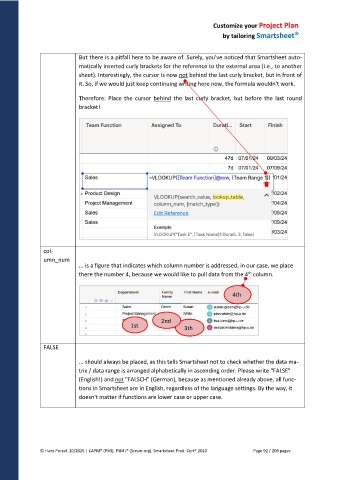
But there is a pitfall here to be aware of. Surely, you've noticed that Smartsheet auto-
matically inserted curly brackets for the reference to the external area (i.e., to another
sheet). Interestingly, the cursor is now not behind the last curly bracket, but in front of
it. So, if we would just keep continuing writing here now, the formula wouldn't work.
Therefore: Place the cursor behind the last curly bracket, but before the last round
bracket!
col-
umn_num
... is a figure that indicates which column number is addressed, in our case, we place
th
there the number 4, because we would like to pull data from the 4 column.
4th
2nd
1st
3th
FALSE
... should always be placed, as this tells Smartsheet not to check whether the data ma-
trix / data range is arranged alphabetically in ascending order. Please write "FALSE"
(English!) and not "FALSCH" (German), because as mentioned already above, all func-
tions in Smartsheet are in English, regardless of the language settings. By the way, it
doesn't matter if functions are lower case or upper case.
© Hans Porzel, 10/2025 | CAPM® (PMI), PSM I® (Scrum.org), Smartsheet Prod. Cert® 2020 Page 92 / 209 pages

