


Page 88 - Customize-Project-Plan-by-tailoring-Smartsheet
P. 88
Customize your Project Plan
by tailoring Smartsheet
CASE STUDY
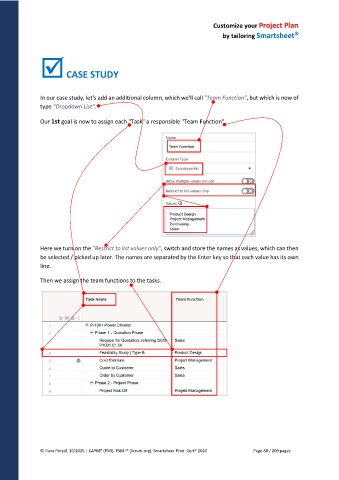
In our case study, let's add an additional column, which we'll call "Team Function", but which is now of
type "Dropdown List".
Our 1st goal is now to assign each "Task" a responsible "Team Function".
Here we turn on the "Restrict to list values only", switch and store the names as values, which can then
be selected / picked up later. The names are separated by the Enter key so that each value has its own
line.
Then we assign the team functions to the tasks.
© Hans Porzel, 10/2025 | CAPM® (PMI), PSM I® (Scrum.org), Smartsheet Prod. Cert® 2020 Page 88 / 209 pages

