


Page 70 - Customize-Project-Plan-by-tailoring-Smartsheet
P. 70
Customize your Project Plan
by tailoring Smartsheet
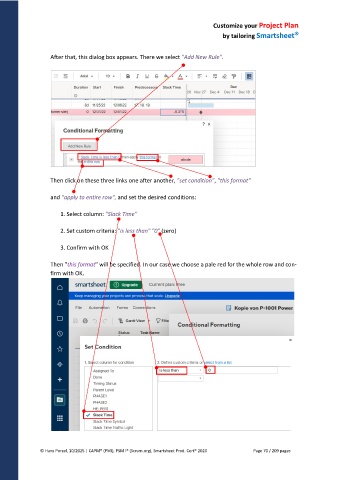
After that, this dialog box appears. There we select "Add New Rule".
Then click on these three links one after another, "set condition", "this format"
and "apply to entire row", and set the desired conditions:
1. Select column: "Slack Time"
2. Set custom criteria: "is less than" "0" (zero)
3. Confirm with OK
Then "this format" will be specified. In our case we choose a pale red for the whole row and con-
firm with OK.
© Hans Porzel, 10/2025 | CAPM® (PMI), PSM I® (Scrum.org), Smartsheet Prod. Cert® 2020 Page 70 / 209 pages

