


Page 67 - Customize-Project-Plan-by-tailoring-Smartsheet
P. 67
Customize your Project Plan
by tailoring Smartsheet
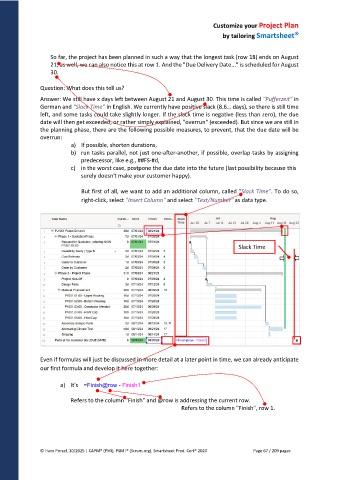
So far, the project has been planned in such a way that the longest task (row 18) ends on August
21, as well, we can also notice this at row 1. And the "Due Delivery Date..." is scheduled for August
30.
Question: What does this tell us?
Answer: We still have x days left between August 21 and August 30. This time is called "Pufferzeit" in
German and "Slack Time" in English. We currently have positive slack (8.6… days), so there is still time
left, and some tasks could take slightly longer. If the slack time is negative (less than zero), the due
date will then get exceeded, or rather simply explained, "overrun" (exceeded). But since we are still in
the planning phase, there are the following possible measures, to prevent, that the due date will be
overrun:
a) If possible, shorten durations,
b) run tasks parallel, not just one-after-another, if possible, overlap tasks by assigning
predecessor, like e.g., ##FS-#d,
c) in the worst case, postpone the due date into the future (last possibility because this
surely doesn't make your customer happy).
But first of all, we want to add an additional column, called "Slack Time". To do so,
right-click, select "Insert Column" and select "Text/Number" as data type.
Slack Time
Even if formulas will just be discussed in more detail at a later point in time, we can already anticipate
our first formula and develop it here together:
a) It's =Finish@row - Finish1
Refers to the column "Finish" and @row is addressing the current row.
Refers to the column "Finish", row 1.
© Hans Porzel, 10/2025 | CAPM® (PMI), PSM I® (Scrum.org), Smartsheet Prod. Cert® 2020 Page 67 / 209 pages

