


Page 77 - Customize-Project-Plan-by-tailoring-Smartsheet
P. 77
Customize your Project Plan
by tailoring Smartsheet
But to display these red, yellow, green bullets, we use in the IF-function the words "Red", "Yellow",
and "Green".
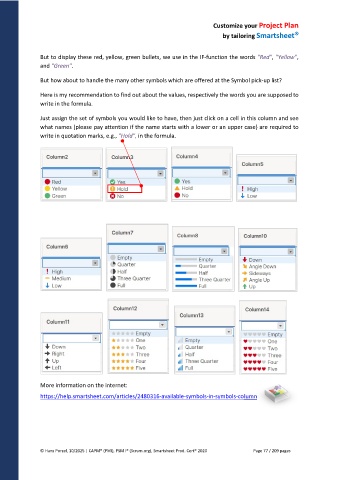
But how about to handle the many other symbols which are offered at the Symbol pick-up list?
Here is my recommendation to find out about the values, respectively the words you are supposed to
write in the formula.
Just assign the set of symbols you would like to have, then just click on a cell in this column and see
what names (please pay attention if the name starts with a lower or an upper case) are required to
write in quotation marks, e.g., "Hold", in the formula.
More information on the internet:
https://help.smartsheet.com/articles/2480316-available-symbols-in-symbols-column
© Hans Porzel, 10/2025 | CAPM® (PMI), PSM I® (Scrum.org), Smartsheet Prod. Cert® 2020 Page 77 / 209 pages

