


Page 29 - Customize-Project-Plan-by-tailoring-Smartsheet
P. 29
Customize your Project Plan
by tailoring Smartsheet
9. Personal Settings
9.1. Personal Settings
9.1.1. Country Settings
• The Country Setting affects the date format. Choosing the right one is important to avoid mis-
understandings. Best example: 6/8/2024; - is this August 6th or June 8th? A misinterpretation
can have fatal consequences.
• Not every employee in Germany speaks English and not everyone in the world speaks German.
Please adjust the Country Setting to the group of people where you deal with; in case of a
mixed group, always pick English as this is the recognized business language in the world.
• The Country Settings behavior of the Smartsheet software affects mainly the handling of for-
mulas. The syntax separation at so-called functions is a semicolon (;) in German, but a comma
(,) in the English setting. The same applies to the separation in the column / field "Predecessor",
e.g., 5;6 (German setting) or 5,6 (English setting).
• Names of Smartsheet functions (e.g., IF, VLOOKUP) in formulas are always in English. For ex-
ample: German has the WENN- function, but in English is this still IF, even if German is set up
at Country Setting.
9.1.2. Auto-save Settings
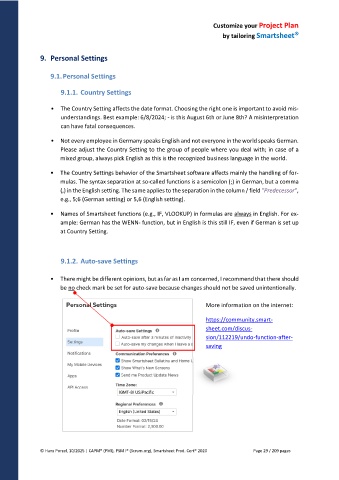
• There might be different opinions, but as far as I am concerned, I recommend that there should
be no check mark be set for auto-save because changes should not be saved unintentionally.
More information on the internet:
https://community.smart-
sheet.com/discus-
sion/112219/undo-function-after-
saving
© Hans Porzel, 10/2025 | CAPM® (PMI), PSM I® (Scrum.org), Smartsheet Prod. Cert® 2020 Page 29 / 209 pages

