


Page 60 - Customize-Project-Plan-by-tailoring-Smartsheet
P. 60
Customize your Project Plan
by tailoring Smartsheet
22. Link Cells from / to other sheets (in-bound / out-bound)
22.1. Linking (In-bound / Out-bound)
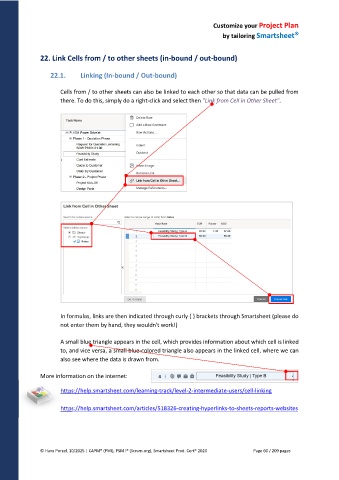
Cells from / to other sheets can also be linked to each other so that data can be pulled from
there. To do this, simply do a right-click and select then "Link from Cell in Other Sheet".
In formulas, links are then indicated through curly { } brackets through Smartsheet (please do
not enter them by hand, they wouldn't work!)
A small blue triangle appears in the cell, which provides information about which cell is linked
to, and vice versa, a small blue-colored triangle also appears in the linked cell, where we can
also see where the data is drawn from.
More information on the internet:
https://help.smartsheet.com/learning-track/level-2-intermediate-users/cell-linking
https://help.smartsheet.com/articles/518326-creating-hyperlinks-to-sheets-reports-websites
© Hans Porzel, 10/2025 | CAPM® (PMI), PSM I® (Scrum.org), Smartsheet Prod. Cert® 2020 Page 60 / 209 pages

