


Page 48 - Customize-Project-Plan-by-tailoring-Smartsheet
P. 48
Customize your Project Plan
by tailoring Smartsheet
CASE STUDY
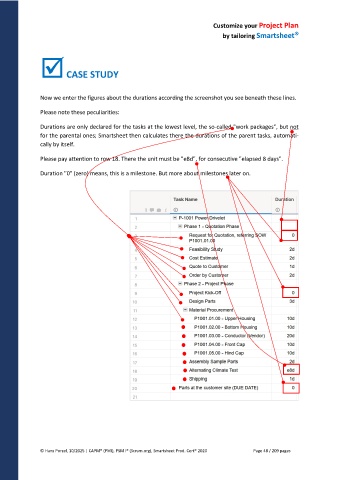
Now we enter the figures about the durations according the screenshot you see beneath these lines.
Please note these peculiarities:
Durations are only declared for the tasks at the lowest level, the so-called "work packages", but not
for the parental ones; Smartsheet then calculates there the durations of the parent tasks, automati-
cally by itself.
Please pay attention to row 18. There the unit must be "e8d", for consecutive "elapsed 8 days".
Duration "0" (zero) means, this is a milestone. But more about milestones later on.
© Hans Porzel, 10/2025 | CAPM® (PMI), PSM I® (Scrum.org), Smartsheet Prod. Cert® 2020 Page 48 / 209 pages

