


Page 45 - Customize-Project-Plan-by-tailoring-Smartsheet
P. 45
Customize your Project Plan
by tailoring Smartsheet
15. Define Start Date
Now the "Start Date" needs to be set-up. My
recommendation is to color the cell back-
ground "green" because only here (!) is an en-
try allowed in the "Start" column. All other
tasks (work packages, rows, ...) then relate on
this, since they will later be linked via "Depend-
encies" / "Predecessors".
Please do not make the mistake of making any entries in any cells of the "Start" or "Finish"
columns, either. The two columns "Start" and "Finish" are for now absolutely taboo, just
with the exception of the entry of this mentioned "Start Date".
CASE STUDY
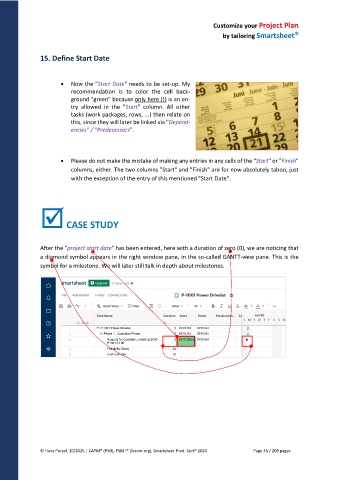
After the "project start date" has been entered, here with a duration of zero (0), we are noticing that
a diamond symbol appears in the right window pane, in the so-called GANTT-view pane. This is the
symbol for a milestone. We will later still talk in depth about milestones.
© Hans Porzel, 10/2025 | CAPM® (PMI), PSM I® (Scrum.org), Smartsheet Prod. Cert® 2020 Page 45 / 209 pages

