


Page 41 - Customize-Project-Plan-by-tailoring-Smartsheet
P. 41
Customize your Project Plan
by tailoring Smartsheet
14. Tasks, Parent Task, Levels & Hierarchy
Terms and their explanation: Parent / Children / Task / Work package:
From a project management point of view, people like to speak of "work packages"
when they talk about tasks.
In Smartsheet is a work package for a person called "Task".
In Smartsheet is the name "Parent" used if there are some tasks grouped underneath,
which are then there called "Children". A summary process, is a "Parent".
"Tasks" should go into the project plan chronologically, means in a plausible timely
order, so that they are then listed from top to bottom.
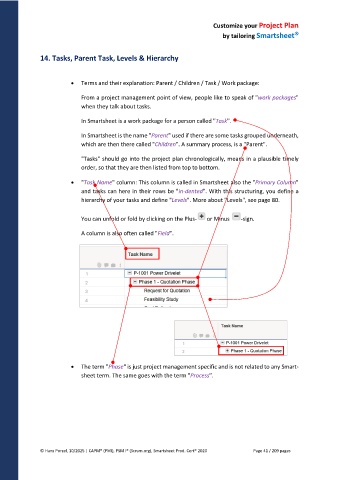
"Task Name" column: This column is called in Smartsheet also the "Primary Column"
and tasks can here in their rows be "in-dented". With this structuring, you define a
hierarchy of your tasks and define "Levels". More about "Levels", see page 80.
You can unfold or fold by clicking on the Plus- or Minus -sign.
A column is also often called "Field".
The term "Phase" is just project management specific and is not related to any Smart-
sheet term. The same goes with the term "Process".
© Hans Porzel, 10/2025 | CAPM® (PMI), PSM I® (Scrum.org), Smartsheet Prod. Cert® 2020 Page 41 / 209 pages

